Seven-Inch Digital Photo Frame Pre-Build
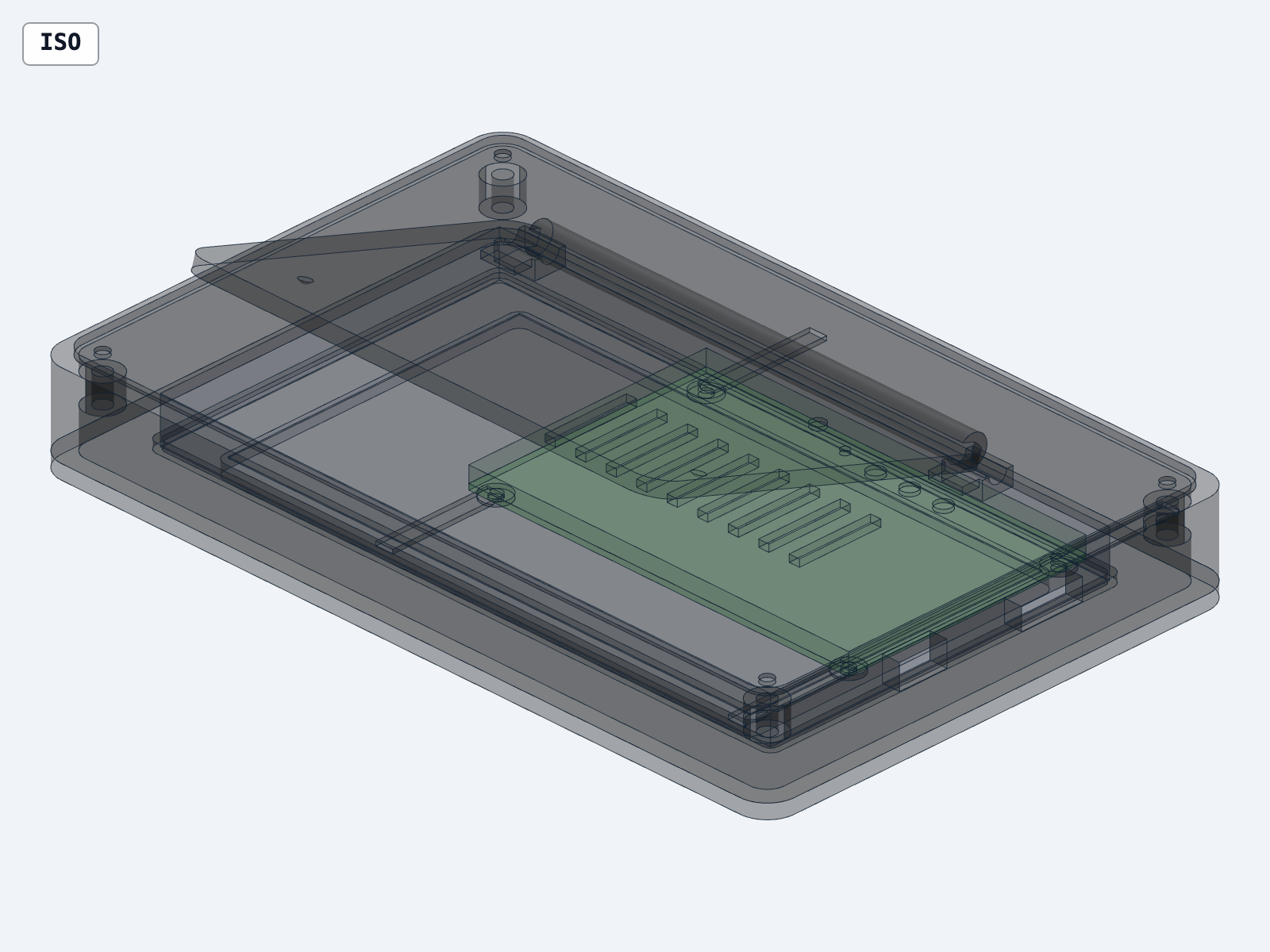
This one-shot cleanroom result combines a parametric enclosure, folding easel stand, exact-part KiCad schematic and four-layer PCB source, shared mechanical/electrical interfaces, and a named Burr motion in one inspectable project. It is published as an incomplete, repair-required digital pre-build because the PCB does not pass DRC/parity and the populated board could not truthfully be integrated.
How it was made
The publisher’s ingredients and steps. Unlisted details are unknown. Copy this text kit to your agent to adapt it.
Models
- GPT-5.6 · OpenAI · execution · Codex
Agent
Codex
Pinned skills
- fraylabs/burr/skills/burr ↗Commit
3a1b8ebf17e178b28c6d65f67ad04fc97f009a55 - earthtojake/text-to-cad/skills/cad ↗Commit
fc4f7069fb31c131a55f1ecd334b505f031f486b - American-Embedded/kistack/skills/schematic ↗Commit
c5a25d1d0af7ae811666cab41d7952f41e310575 - American-Embedded/kistack/skills/pcb ↗Commit
c5a25d1d0af7ae811666cab41d7952f41e310575 - American-Embedded/kistack/skills/bom ↗Commit
c5a25d1d0af7ae811666cab41d7952f41e310575 - American-Embedded/kistack/skills/export ↗Commit
c5a25d1d0af7ae811666cab41d7952f41e310575 - American-Embedded/kistack/skills/firmware ↗Commit
c5a25d1d0af7ae811666cab41d7952f41e310575
References
- Published brief and result ↗document
Existing result context and its stated limits.
- Recorded execution prompt ↗document
Original reusable prompt; preserved unchanged.
- RUN_REPORT.md ↗document
Published evidence used to reconstruct the ordered workflow.
- PUBLICATION_REVIEW.md ↗document
Published evidence used to reconstruct the ordered workflow.
- INTERFACE_CONTROL.md ↗document
Published evidence used to reconstruct the ordered workflow.
Tools and APIs
- Burr
Inspect the integrated enclosure and named easel-stand motion with retained check results.
- CAD provider
Generate and validate the parametric enclosure and stand STEP models.
- KiCad
Inspect the schematic, four-layer PCB source, ERC and failed DRC/parity evidence.
Ordered steps
Start the documented cleanroom run
Reconstructed workflow from the published prompt and available result artifacts; this is not a recorded sequence of agent turns. Give an isolated Codex agent the unchanged prompt, pinned Burr, CAD and KiStack skills, and an empty workspace, as recorded in the run report.
Create mechanical and electrical sources
Model the enclosure and folding stand; generate exact-part schematic and PCB source with shared mechanical/electrical interfaces, BOM and assembly documentation.
Apply the fabrication gate
Run CAD validation, ERC, DRC and parity checks. The saved project passes mechanical validation and ERC but fails DRC/parity; withhold populated PCB STEP and fabrication outputs and label the conservative board envelope.
Inspect integration and known defects
Review the named motion, retained failed/incomplete Burr checks and publication review. Repair hinge, display, USB-C, parity and portability defects before treating this as buildable hardware; physical function remains untested.
About
This one-shot cleanroom result combines a parametric enclosure, folding easel stand, exact-part KiCad schematic and four-layer PCB source, shared mechanical/electrical interfaces, and a named Burr motion in one inspectable project. It is published as an incomplete, repair-required digital pre-build because the PCB does not pass DRC/parity and the populated board could not truthfully be integrated.
An isolated Codex agent received only the exact prompt in prompt.md, the Burr skill, its routed CAD provider, the referenced KiStack skills, and an empty workspace. It did not see the hanger run, and the parent agent did not steer it after execution began.
What the run produced
- A 216 × 138 mm seven-inch frame enclosure with front bezel, rear chassis, removable service cover, ventilation, connector openings, and folding stand.
- Deployed, folded, and rear-cover-open exploded STEP assemblies.
- Four printable STL parts and editable parametric Python source.
- KiCad project, schematic, four-layer PCB source, grouped BOM, schematic PDF/SVG, and an interface-control document.
- Exact selections for the display, ESP32-S3 module, 3.3 V buck, USB-C receptacle, microSD socket, ambient-light sensor, and protection parts.
- A portable Burr project with a 1.2-second
Fold easel standmotion.
What is actually verified
- All nine final mechanical CAD targets passed topology, closure, and positive-volume validation.
- Burr loaded an eight-instance integrated assembly and generated a 61-frame rigid fold motion.
- KiCad ERC exits 0 with zero errors and zero warnings.
- The generated schematic PDF and grouped BOM are present and inspectable.
The electronics are not fabrication-ready. The saved KiCad DRC receipt exits 5 with 742 violations and 295 schematic-parity issues. Independent reruns reproduced the same failure and 295 parity issues, while the DRC violation count varied from 740 to 784 after zone refill. No populated PCB STEP, PCB renders, Gerbers, or drill files were generated after that failed gate. The CAD assembly therefore contains an explicitly named conservative PCB envelope rather than an invented populated board.
Burr's integrated checks also remain failed/incomplete: six deployed pairs, seven folded pairs, and three exploded pairs, all with an open-component-mesh caveat.
Repair-required boundary
This project does not claim working display operation, correct routing, fabrication readiness, connector engagement, power integrity, radio performance, EMC, thermal or electrical safety, manufacturability, fit, stand stability, durability, or production readiness. The next design pass must repair routing, planes, keepouts, footprint parity, exact component 3D coverage, board/enclosure integration, and Burr findings before fabrication outputs are considered.
Publication review identified additional source-level blockers: the stand barrel has no hinge-pin bore and is offset from the chassis hinge axis; the stated display mounting-hole pattern exceeds the stated display envelope; the USB-C sink does not detect or limit itself to the source-advertised current; schematic-to-PCB footprint parity is not fail-closed; and the electronics generator contains host-specific KiCad and Python paths. These defects are preserved rather than silently repaired so the outcome remains an authentic one-shot result; see artifacts/docs/PUBLICATION_REVIEW.md.
Extract the project archive, change into the extracted project root, and run burr .. The electronics sources can be inspected with KiCad 10.0.6 or a compatible release. The downloadable archive's motion configuration was migrated after the cleanroom run to Burr 0.34's single-source joint format; its CAD, original report, and validation receipts remain unchanged.
Exact prompt
Hidden characters, if present, appear as Unicode escapes$burr
Design a complete digital pre-build for a compact, premium-looking, seven-inch tabletop digital photo frame. The result must include both the mechanical product and its actual electronic design: enclosure CAD, display integration, schematic, PCB layout and the populated board’s mechanical integration. An enclosure containing placeholder rectangles is not a complete result.
Use Burr as the project environment. Use the installed mechanical CAD provider for the enclosure and assembly, and the installed KiStack/KiCad skills for schematic, PCB, BOM, validation and populated STEP export. Preserve CAD and KiCad as separate authoritative sources and combine only their exported geometry for the final product assembly.
If either required provider is unavailable, stop and report the experiment as incomplete. Do not silently omit the PCB or replace it with an invented board.
## Product definition
Design an indoor, landscape-oriented photo frame for a desk, shelf or bedside table.
Target characteristics:
- Approximately seven-inch IPS display.
- Overall front envelope no larger than approximately 230 × 165 mm.
- Enclosure depth approximately 22–30 mm, excluding the deployed stand.
- Wide, stable folding easel stand with a hard viewing-angle stop around 15–20 degrees from vertical.
- Stand folds substantially flush for packing and has a credible retention feature in both folded and deployed positions.
- Removable rear service cover secured with reusable fasteners and inserts; do not permanently glue the product closed.
- Display, PCB and controls must be individually replaceable without destroying the enclosure.
- Rounded, restrained exterior suitable for a home rather than a development-board enclosure.
- Landscape operation is required; portrait operation, touch input, audio, camera and battery operation are out of scope.
Power the product from an external certified 5 V USB-C adapter. Do not include mains circuitry, a lithium battery or charging circuitry.
## Electronics architecture
Create a real KiCad project around an ESP32-S3 module with sufficient flash and PSRAM for a display framebuffer and Wi-Fi photo transfer. You are explicitly authorized to select exact electronic parts, packages and footprints for this digital pre-build.
Select a real, currently documented seven-inch display or display module that is electrically compatible with the controller architecture. Prefer a module with an integrated display timing or backlight solution when that materially reduces risk. Record the exact manufacturer, part number, datasheet URL, active area, outer dimensions, mounting geometry, connector and pinout.
Do not invent a display pinout, FPC connector, footprint, component rating or package. If the required public manufacturer documentation cannot be obtained, choose a different supported component or mark the result incomplete.
The electronics must include:
- ESP32-S3 module with Wi-Fi, flash and PSRAM.
- Selected display connector and required interface circuitry.
- Backlight power and brightness control appropriate to the selected display.
- USB-C 5 V power-only input with correct sink configuration.
- Input protection appropriate to a low-voltage prototype, including fuse or current limiting and ESD protection.
- Required regulated rails with documented current budgets and component derating.
- MicroSD storage.
- Three accessible user buttons for previous, next and menu or wake.
- Reset and boot access for development.
- Ambient-light sensing for automatic brightness.
- Status LED that does not shine directly through the display.
- Programming and debugging access plus labeled test points for major power rails and critical signals.
Use a four-layer PCB unless verified routing and return-path requirements justify another stack-up. Keep the PCB compact enough to sit behind the display without blocking the stand hinge, ventilation or service access.
Base the schematic on manufacturer datasheets and reference designs. Include decoupling, pull-ups or pull-downs, protection, boot strapping and unused-pin treatment. Record every consequential design choice and every unresolved assumption.
## Mechanical and electronic integration
Create one shared interface-control document defining:
- Product coordinate system and origins.
- Display active area, outer envelope, thickness and mounting features.
- PCB outline, board thickness and mounting-hole coordinates.
- Maximum component-height envelopes on both PCB sides.
- USB-C, microSD, button and programming-port locations.
- Cable and FPC bend or insertion keepouts.
- Stand hinge axis and folded/deployed envelopes.
- Minimum clearances used between electronics and enclosure.
Export the populated PCB from KiCad as STEP with component models wherever available. Missing critical component models must be documented and represented by conservative named envelopes rather than omitted.
Use the populated PCB STEP, selected display model or documented display envelope, and enclosure parts in the final mechanical assembly.
The enclosure must include:
- Display ledge or bracket that locates the display without loading the active glass.
- Replaceable compliant-pad or gasket allowance.
- PCB standoffs aligned to the KiCad mounting holes.
- Accessible and correctly aligned USB-C, microSD and button openings.
- Connector insertion space and cable strain relief.
- Ventilation near the controller and power circuitry.
- At least 1.5 mm nominal side clearance around PCB edges and at least 2 mm above the tallest modeled component, unless a documented local exception is required.
- A stable stand footprint and hard stop that cannot pass through the rear cover.
- No fastener, standoff or rib intersecting the PCB, display, connectors or cable paths.
Treat the detailed populated PCB as one named subsystem occurrence in the simplified Burr product-motion assembly so the folding stand animation remains below Burr’s component limit. Preserve the detailed board STEP separately for inspection.
## Deliverables
Produce one portable Burr project containing:
### KiCad authority
- `.kicad_pro`, `.kicad_sch` and `.kicad_pcb` sources.
- Any project-local symbols, footprints and 3D models.
- Exact-part BOM with manufacturer part numbers and datasheet links.
- Schematic PDF.
- ERC report.
- DRC report with schematic parity.
- PCB top and bottom renders.
- Populated PCB STEP export.
- A concise power-budget and interface report.
- Firmware pin map and bring-up requirements. Production firmware implementation is out of scope.
### Mechanical authority
- Editable parametric CAD source.
- Individual enclosure-part STEP files.
- STL or 3MF exports for prototype-printable enclosure parts.
- Rear-cover-open exploded assembly.
- Complete product STEP with the populated PCB and display installed.
- Stand-folded and stand-deployed STEP assemblies with identical named rigid components.
- Interface-control document shared with the KiCad design.
- BOM and assembly instructions for enclosure hardware.
### Burr project
- Organize viewable files under clear `models/cad`, `models/kicad` and `models/assembly` folders.
- Add a portable `.burr/config.toml` with those stable model roots.
- Configure a named Fold stand motion between the stand-deployed and stand-folded product assemblies.
- Include final Burr snapshots and check evidence.
Do not generate or present fabrication outputs as production-ready. Gerbers and drill files may be generated only for design review after clean ERC and DRC results, and must remain clearly marked as unverified prototype outputs.
## Validation
Run KiCad CLI validation and preserve the exact reports:
- Schematic ERC with error-level violations treated as failure.
- PCB DRC with error-level violations treated as failure.
- Schematic-to-PCB parity.
- BOM generation from the schematic rather than hand-edited CSV.
- Populated PCB STEP export and top/bottom renders.
- Confirmation that critical components have exact footprints and documented pinouts.
Run CAD validation:
- Every manufactured enclosure part is a closed, positive-volume solid.
- Overall product dimensions match the stated envelope.
- Display active area is centered and unobstructed.
- KiCad mounting holes align with CAD standoffs.
- External openings align with their actual connectors and controls.
- Board-edge, component-height and insertion clearances meet the documented values.
- Stand folded and deployed poses use unchanged rigid component geometry.
- No unintended positive-volume intersections exist between the display, PCB subsystem, enclosure, cover, fasteners and stand.
- Prototype-printable enclosure parts fit within a stated build volume.
Open all final STEP outputs in Burr. Inspect the complete product in Solid and X-ray modes, verify the stand motion plays, and run Burr’s supported interference check on the integrated assembly. An `Incomplete` Burr result must remain incomplete; do not convert it into a pass based on appearance.
Save and review:
- Front product view.
- Rear stand-deployed view.
- Stand-folded view.
- Rear-cover-open exploded view.
- X-ray view showing display, populated PCB and enclosure.
- USB-C and microSD alignment details.
- PCB top and bottom renders.
- Readable schematic overview.
- Burr motion and check evidence.
Repair source-level problems, regenerate affected outputs and rerun the failed validations before finishing.
## Limits
This is a digital pre-build, not a proven working or production-ready product. Do not purchase parts, order boards, fabricate the enclosure, power hardware or claim verified display operation, radio performance, EMC compliance, thermal safety, electrical safety, firmware completeness, print quality or manufacturability.
If exact datasheets, footprints, component models, providers or validation tools are unavailable, preserve the partial work and report the result as incomplete rather than inventing evidence.
Return the authoritative CAD and KiCad source paths, generated artifacts, selected exact parts, Burr and KiCad versions, ERC and DRC outcomes, CAD and Burr results, reviewed images, unresolved warnings and the physical bring-up tests still required.Download the result
- ZIPComplete portable Burr, CAD, and KiCad project↓
- SHA-256Prompt and primary artifact hashes↓
- PythonShared parametric enclosure source↓
- PythonKiCad project generator↓
- KiCadKiCad project↓
- KiCad schematicKiCad schematic source↓
- KiCad PCBFour-layer PCB source requiring repair↓
- STEPDeployed product assembly↓
- STEPFolded product assembly↓
- STEPRear-cover-open exploded assembly↓
- PDFGenerated schematic↓
- CSVGrouped electronics BOM↓
- MarkdownMechanical and electrical interface control↓
- MarkdownMechanical CAD brief↓
- MarkdownMechanical BOM and assembly notes↓
- MarkdownPower and interface analysis↓
- MarkdownFirmware pin map and staged bring-up plan↓
- MarkdownExact selected parts and official sources↓
- MarkdownCleanroom and independent review report↓
- MarkdownPublication review and known source blockers↓
- KiCad reportKiCad ERC report↓
- KiCad reportFailed KiCad DRC and parity report↓
- JSONLFinal CAD validation receipts↓
- JSONBurr deployed interference result↓
- JSONBurr folded interference result↓
- JSONBurr exploded interference result↓
- PNGBurr integrated failed check evidence↓
Technical details and provenance
- Provider
- OpenAI
- Model
- GPT-5.6
- Agent
- Codex
- Published
- Publication
- community